


Voice GPS - Maps & Navigation
4.2108.00 Reviews
App Specs
- Version
- 1.57
- Updated On
- License
- Free
- Downloads
- 100,000+
- Developer
- TALYMIND APPS LTD
- Categories
- Travel & Local
- Platform
- Android
Screenshots

 Analysis by AppCompare
I tend to judge a navigation app by what happens before I start the engine: can I set up a route without fuss, and will its guidance be easy to follow once the road gets busy? Voice GPS - Maps & Navigation is aimed at people who want maps and spoken directions together, with street view and live weather among its travel tools. That combination makes it worth considering for everyday journeys as well as unfamiliar drives, though it still pays to prepare rather than expect any phone app to solve every road problem automatically.
A sensible routine before setting off
My preferred way to use a navigation app is to enter the destination while parked, review the route, and only then begin driving. Voice GPS is built around a map and search field, so that basic sequence is easy to understand. I would use the map to check that the destination pin is in the right place, especially for large sites, edge-of-town addresses, or places with more than one entrance. A correctly spelled destination is not always the same as the entrance you actually need.
For a familiar commute, it can be tempting to start moving as soon as a route appears. I find it more useful to take a brief look at the first few turns and the general direction of travel first. That helps me notice an awkward departure or a destination on the opposite side of a divided road before I am committed to it. Voice guidance is most valuable when it supplements that quick orientation, rather than replacing attention to signs and surrounding traffic.
What I would check in the settings
Before relying on spoken directions, I would check that the phone’s sound is audible in the car and that the navigation voice can be heard over music or conversation. A voice prompt only helps if it reaches the driver at the right moment. I would also check the phone’s operating-system compatibility before installing: the app supports Android 7.0 and later. Keeping the phone secured and setting the route while stationary are small habits that make navigation less distracting.
It is also worth thinking through when a feature is useful rather than turning everything on by default. Street view can help me inspect a destination or get a visual sense of a nearby street before arrival, while live weather is more useful when conditions may affect the journey. Neither replaces looking at the road or checking local conditions directly. I treat those tools as context for planning, not as a guarantee that the route ahead will be trouble-free.
Useful habits for repeat journeys
On regular trips, I would make route entry a consistent part of leaving: confirm the exact destination, start guidance before pulling away, and listen for the first instruction before changing lanes or turning. That routine is especially helpful when a familiar trip begins somewhere unusual, such as a temporary parking spot or a different entrance to a workplace. It reduces the chance of following an old mental route while the app is trying to take me somewhere else.
For an unfamiliar stop, I would use the map and street view together before the final stretch. If a place is inside a large building or complex, the map may bring me near it without making the correct door obvious. Looking at the surrounding streets in advance gives me a chance to identify a sensible approach and avoid making a last-second turn. I would still follow posted signs and use a safe place to stop if I need to reassess.
Worth Reading Before You Choose

Flipboard Shows What News Apps Must Do Beyond the Feed

Switching to Android Auto Means Rethinking Your Driving Routine

Google Calendar Makes a Crowded Week Easier to Manage

Ludo King Makes the Most of the Minutes Between Plans

Baby Panda World Brings Quick Play to Modern Phones, but Its Game Library Feels Busy

ESPN’s Live Game View Makes Following Close Games Easier
Where I would be cautious
Voice GPS is a travel and local-navigation app from TALYMIND APPS LTD. It is free to install, has a 4.6 average from around 30 ratings, and has passed 50,000 installs. Its current version is 1.42, and the age classification is Everyone. Optional in-app purchases range from $3.99 to $17.99 per item, so I would check the purchase details in the app before paying for anything and decide whether those extras fit how I travel.
One practical trade-off is that a navigation app depends on a phone being usable throughout the trip: battery, sound, a secure mount, and a clear view of the screen all matter. I would not handle the phone while driving to correct a route. If a turn is missed, it is safer to let the app respond or pull over somewhere appropriate. Weather information and map guidance are aids, not substitutes for road signs, local rules, or sound judgement in changing conditions.
Getting Started with Voice GPS
Diving into Voice GPS - Maps & Navigation was surprisingly straightforward. After a quick download and installation, which you can easily find on both Android and iOS platforms, the app launched with an intuitive interface. I was up and running in no time, ready to explore its functionalities.
The app kicks off with a clean home screen, showcasing the map and a search bar. It's a no-fuss setup that instantly makes you feel at home. The first thing I noticed was the smooth scrolling and zooming, which is crucial when you're trying to get your bearings in unfamiliar territory.
Features That Stand Out
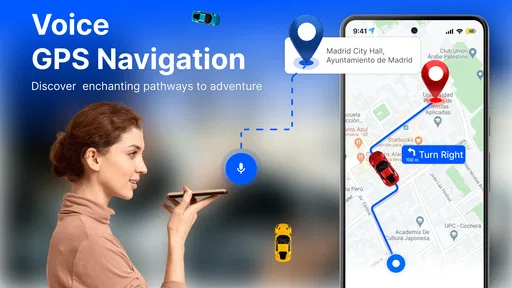
One of the standout features of this app is its voice navigation. It’s like having a co-pilot who doesn’t get annoyed when you miss a turn. The voice is clear and gives timely directions, allowing you to keep your eyes on the road. This is especially handy when driving in busy city traffic or long stretches of highway.
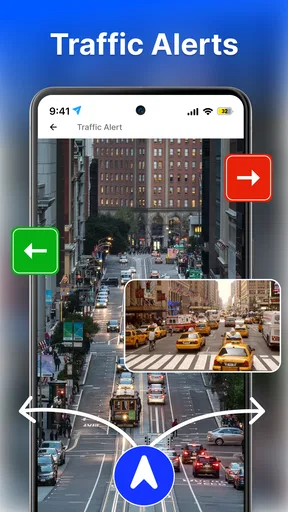
Another cool feature is the app's ability to offer real-time traffic updates. We’ve all been there – stuck in traffic, gritting our teeth. With Voice GPS, the app reroutes you to avoid congestion, saving you precious time and sanity. I've found this particularly helpful during rush hours.
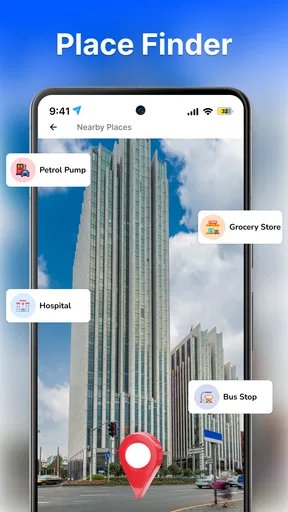
For those who enjoy exploring new places, the app includes a convenient points of interest (POI) feature. Whether you're looking for the nearest gas station, a cozy café, or a must-see landmark, this app has got you covered. It's like having a local guide right in your pocket.
Ease of Use and Navigation
Now, I know what you're thinking: how user-friendly is it really? Well, the app excels in simplicity without compromising on functionality. The search function is robust, quickly finding addresses and locations. Plus, the app supports multiple languages, which is a bonus for international travelers.
One thing I love is the offline maps feature. Imagine driving through a remote area with no signal – panic mode, right? But with Voice GPS, you can download maps beforehand and navigate without a hitch. It's a lifesaver when you're off the beaten path.
Personal Experience on the Road
On a recent road trip along the coast, I decided to put Voice GPS to the ultimate test. The app didn’t just guide me through scenic routes; it also alerted me to speed limits and potential hazards. The speedometer display was particularly handy, keeping me aware and within legal limits.
I also appreciated the lane guidance feature, which was a blessing in complex intersections. The app would show the correct lane to be in, reducing last-minute lane changes and stress. It felt like having a seasoned navigator by my side.
Choosing it for the right kind of trip
I see the strongest case for this app when a driver wants spoken directions alongside a visual map, and also values quick access to nearby places. A visitor in an unfamiliar town, for example, can search for a landmark or café, use voice prompts through the urban turns, and check street view near the destination before choosing where to stop. That is a more useful combination than simply staring at a route line on a map.
For a weekday commute, the traffic information described in my experience can be helpful, but I would not treat a suggested reroute as automatically better. A diversion may save time in one situation and introduce confusing turns in another. When the road is already familiar, I compare the proposed route with what I know and avoid making a sudden maneuver just to follow a change. The app can guide; the driver still has to decide safely.
Compared with the usual approach of opening a general-purpose map app, Voice GPS puts spoken navigation and travel-oriented tools in the same experience. That can suit someone who wants a straightforward driving companion rather than a separate app for every small task. On the other hand, if my priority were a particular ecosystem, deeply integrated local transit planning, or a mapping service I already use for saved places, I would compare those existing tools before switching. The right choice depends on the trip, not on having the longest feature list.
A realistic day on the road
Imagine leaving home for an appointment at an address you have never visited, then stopping for fuel and meeting a friend at a café nearby. I would enter the appointment first while parked, inspect the destination on the map, and begin voice guidance before setting off. If traffic changes the route, I would listen for the new instruction and make the change only when it is safe. After parking, I could search for the next stop rather than trying to type while moving.
That sequence is simple, but it is where an app with several navigation aids can earn its place: each feature has a job. Voice directions help during the drive, points of interest help with a practical stop, and street view can clarify the last few streets. Live weather can inform planning before departure. Using these tools at separate, sensible moments is less distracting than trying to inspect every option mid-journey.
Limits that matter more than the feature list
I would not choose any phone-based navigation as my only source of guidance in a situation where a wrong turn would be costly and there is no safe chance to stop. A driver should still watch signs, lane markings, and changing road conditions. Voice prompts can arrive while a junction is busy, and a map view cannot make an unsafe lane change sensible. If the screen or directions become confusing, continuing safely and finding a place to pull over is better than reacting abruptly.
There is also a difference between having a map available and having every part of a journey covered in the way you expect. Before relying on offline navigation for a remote trip, I would prepare the relevant area and check that the route is accessible before losing reception. I would not assume that every live service behaves the same without a connection. For a trip where uninterrupted connectivity or specialized route information is essential, I would test the setup in advance or use a dedicated alternative as a backup.
The practical cost deserves a little attention too. Free installation makes it easy to try, but optional purchases mean I would review what an item actually unlocks before confirming a payment. Someone who only needs occasional directions may be perfectly content without buying anything; a frequent traveler should judge any paid extra by whether it solves a real recurring need. I prefer that decision to be based on my own routine, not on the idea that more features must automatically mean better navigation.
Who will get the most from it
I would recommend trying it if you often drive to changing destinations, appreciate spoken prompts, and like having weather, street view, and local-place searches close at hand. It should also appeal to travelers who want to familiarize themselves with a destination before the final approach. The Everyone age classification makes it broadly accessible, though younger users should still use navigation responsibly and never interact with a screen while driving.
I would be less inclined to recommend it to someone who rarely travels beyond familiar routes, already has a navigation setup that fits their habits, or needs specialist features that matter more than clear everyday directions. It is also not a substitute for a paper plan or a second device when the journey is critical and connectivity, power, or phone access may be unreliable. Trying it on a low-stakes local trip is a sensible way to see whether its voice guidance and layout suit you before depending on it farther from home.
Final Thoughts
All in all, Voice GPS is more than just a navigation app; it’s a travel companion that enhances your driving experience. Whether you’re a daily commuter or an adventurous traveler, this app caters to all your navigation needs with precision and ease.
So, if you're looking for a reliable, feature-rich navigation app, give Voice GPS a try. It's like having a trusty guide who never gets tired of the open road. Happy travels!
Pros
- Accurate real-time traffic updates.
- Easy-to-use interface for all ages.
- Voice commands reduce distractions.
- Customizable route preferences.
- Works offline with downloaded maps.
Cons
- Occasional lag in voice prompts.
- High battery consumption on long trips.
- Limited language options available.
- Ads can be intrusive and distracting.
- Requires frequent map updates.
FAQs for Voice GPS - Maps & Navigation
What features does Voice GPS - Maps & Navigation offer?
Voice GPS - Maps & Navigation provides turn-by-turn navigation with voice guidance, live traffic updates, and lane guidance. It also includes offline maps, route optimization for driving, walking, and cycling, and integration with various points of interest such as restaurants, gas stations, and hotels. These features make it a comprehensive tool for travelers and daily commuters alike.
Is Voice GPS - Maps & Navigation available offline?
Yes, Voice GPS - Maps & Navigation supports offline mode. You can download maps for specific regions to access them without an internet connection. This feature is particularly useful when traveling in areas with poor network coverage or when trying to save on data usage. Ensure maps are updated regularly for the best experience.
How accurate is the live traffic information in Voice GPS - Maps & Navigation?
The app provides real-time traffic updates sourced from a vast network of users and traffic data providers. While generally accurate, occasional discrepancies can occur due to sudden changes in traffic conditions or road closures. Regular updates and user contributions help maintain the accuracy of traffic information.
Can I customize the voice guidance in the app?
Yes, the app allows for customization of voice guidance. Users can choose from different voice options, adjust the volume, and even select the language of the guidance. These settings help tailor the experience to individual preferences, ensuring clarity and comfort during navigation.
Does Voice GPS - Maps & Navigation support navigation for all types of transportation?
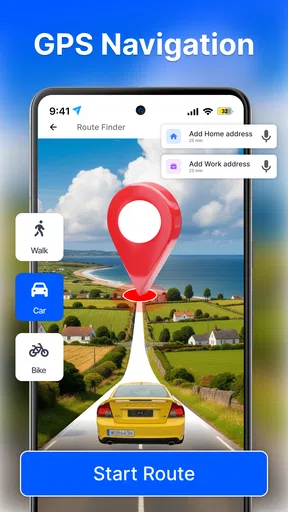
The app supports navigation for various modes of transport, including driving, walking, and cycling. It provides route optimization and specific guidance for each mode, ensuring efficient and safe travel. However, it primarily focuses on road navigation, so public transport features may be limited compared to dedicated transit apps.


